A few months ago, I built a music-sharing platform where users could import their playlists from one platform and make them public so others could import them as well.
Functionally, everything worked. But there was one big problem: I didn’t design for scalability and reliability from the start.
This was unusual for me, because scalability is usually on my mind. The real reason was simple — at the time, I didn’t know how to properly solve the problem.
Fast forward a few weeks later, I learned about workflow engines, and everything clicked.
What Is a Workflow Engine?
A workflow engine is a system that orchestrates long-running, multi-step processes by persisting their state and executing tasks via workers.
This allows the process to:
- survive crashes
- retry on failure
- resume from where it stopped
- avoid losing progress
You can build one from scratch, or use existing tools like Temporal, which is what I used.
The Problem with My Original Design
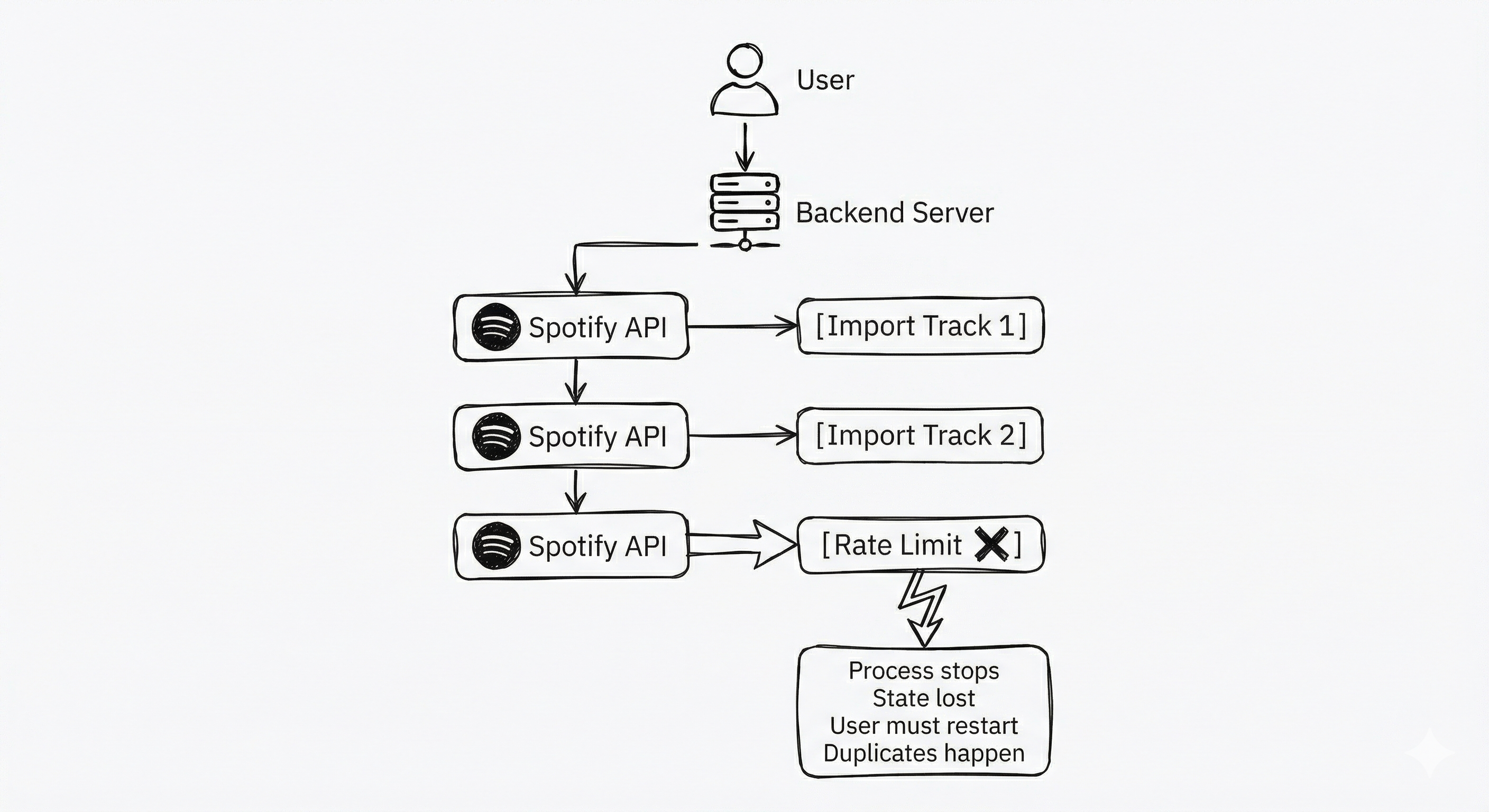
In my original system, when a user imported a playlist:
- The backend would call external music APIs (Spotify, etc.)
- If the API quota was exceeded, the import stopped
- The system had no memory of where it stopped
- When the quota reset, the user had to restart manually
- Previously imported songs were imported again
This caused:
- duplicate tracks
- wasted API quota
- bad user experience
In short: no fault tolerance, no progress tracking, and no recovery.
How a Workflow Engine Fixed This
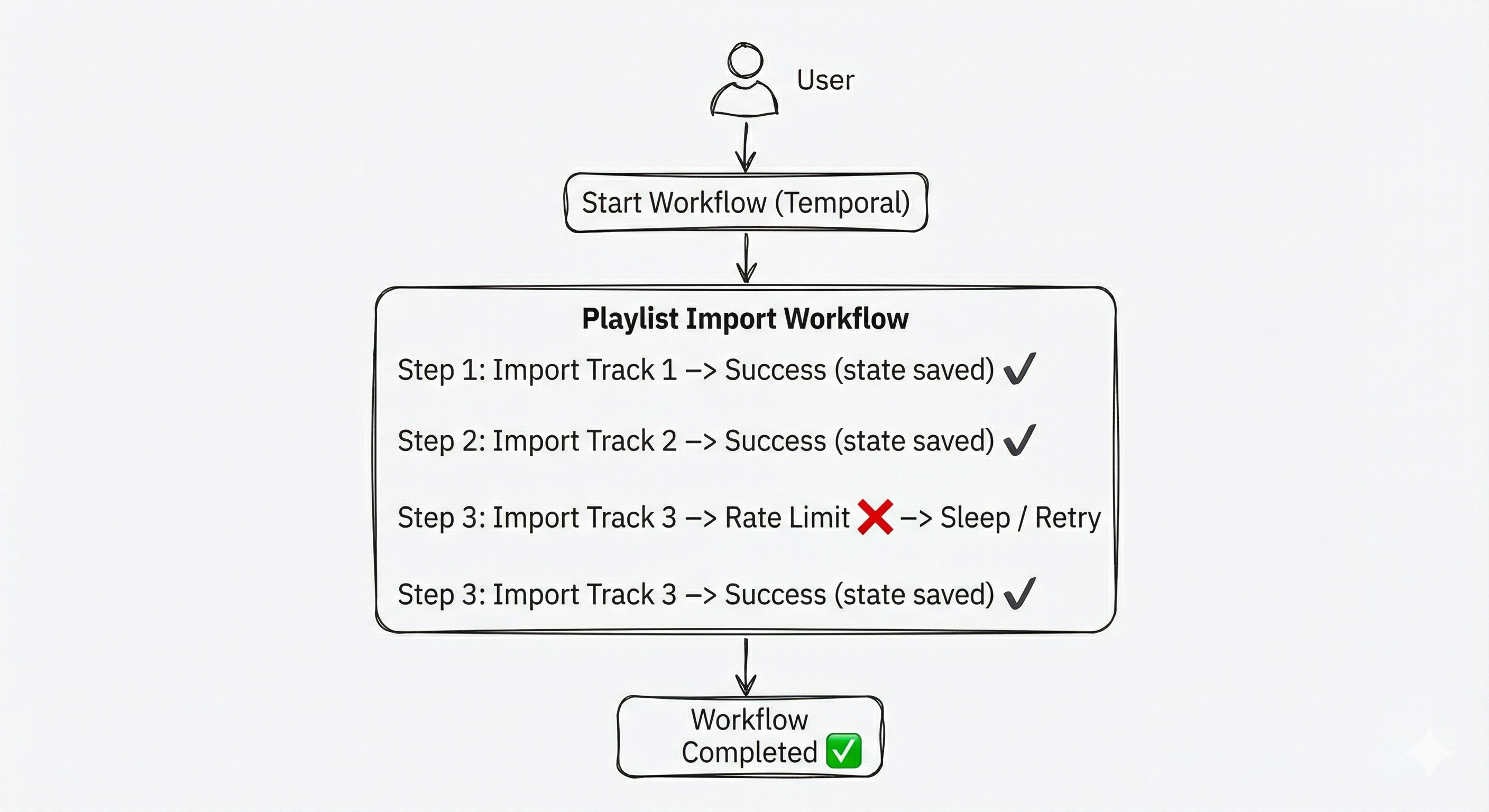
I introduced Temporal as a workflow engine to manage playlist imports.
Each playlist import became a workflow:
- Each track import became a step
- Progress was persisted after every step
- Failures were automatically retried
- The workflow could pause and resume safely
Here’s what the core workflow looks like:
func PlaylistSyncWorkflow(ctx workflow.Context, input PlaylistSyncInput) (*PlaylistSyncResult, error) {
    logger := workflow.GetLogger(ctx)
    logger.Info("Starting PlaylistSyncWorkflow", "playlistID", input.PlaylistID)

    ao := workflow.ActivityOptions{
        StartToCloseTimeout: 10 * time.Minute,
        RetryPolicy: &temporal.RetryPolicy{
            InitialInterval:    time.Second,
            BackoffCoefficient: 2.0,
            MaximumInterval:    time.Minute,
            MaximumAttempts:    5,
        },
    }
    ctx = workflow.WithActivityOptions(ctx, ao)

    // Fetch user and playlist data
    var user db.User
    err := workflow.ExecuteActivity(ctx, FetchUserActivity, input.UserID).Get(ctx, &user)
    if err != nil {
        return nil, fmt.Errorf("failed to fetch user: %w", err)
    }

    var tracks []db.Track
    err = workflow.ExecuteActivity(ctx, FetchPlaylistTracksActivity, input.PlaylistID).Get(ctx, &tracks)
    if err != nil {
        return nil, fmt.Errorf("failed to fetch tracks: %w", err)
    }

    result := &PlaylistSyncResult{
        TracksProcessed: 0,
        TracksFailed:    0,
    }

    // Process each track as a separate activity
    for i, track := range tracks {
        logger.Info("Processing track", "index", i+1, "total", len(tracks), "title", track.Title)

        err = workflow.ExecuteActivity(ctx, AddTrackToSpotifyActivity, user, playlistID, track.SpotifyID).Get(ctx, nil)
        if err != nil {
            result.TracksFailed++
        } else {
            result.TracksProcessed++
        }
    }

    logger.Info("PlaylistSyncWorkflow completed", "processed", result.TracksProcessed, "failed", result.TracksFailed)
    return result, nil
}
This gave me three major wins:
1. Fault Tolerance
If the server crashes, deploys break, or workers restart, the workflow does not lose state.
Temporal replays the workflow from its last known state and continues execution. No manual restarts. No broken imports.
2. Progress Tracking
The system always knows:
- which tracks were imported
- which track is next
- where the process stopped
So if syncing is interrupted, it resumes exactly from the last successful step.
3. Rate Limiting & Retries
When an API quota is hit, the workflow handles it gracefully. Here’s an example from the activity layer:
func AddTrackToSpotifyActivity(ctx context.Context, user db.User, playlistID, trackID string) error {
    client, err := services.GetSpotifyClient(ctx, user)
    if err != nil {
        return fmt.Errorf("failed to get Spotify client: %w", err)
    }

    _, err = client.AddTracksToPlaylist(ctx, spotify.ID(playlistID), spotify.ID(trackID))
    if err != nil {
        if strings.Contains(err.Error(), "429") {
            time.Sleep(30 * time.Second)
            return fmt.Errorf("rate limited, will retry: %w", err)
        }
        return fmt.Errorf("failed to add track: %w", err)
    }
    return nil
}
When rate limited:
- The workflow sleeps
- Retries automatically using Temporal’s retry policy
- Continues when allowed
No duplicated imports. No wasted quota.
Why This Matters Architecturally
Playlist syncing is:
- long-running
- dependent on external APIs
- failure-prone
- stateful
- side-effect heavy
This makes it a perfect use case for a workflow engine.
Without one, you end up writing fragile, ad-hoc logic with:
- cron jobs
- background queues
- manual retries
- inconsistent state
With a workflow engine, these concerns become infrastructure problems, not application problems.
General Use Cases for Workflow Engines
Workflow engines are ideal whenever a process:
- has multiple steps
- can fail
- takes time
- must not lose state
Common real-world examples:
- KYC verification / onboarding
- Payments & billing pipelines
- AI agent task orchestration
- CI/CD pipelines
- E-commerce order fulfillment
- Data pipelines and ETL jobs
Final Thought
Learning about workflow engines completely changed how I think about system design.
Instead of asking:
“How do I make this work?”
I now ask:
“How do I make this survive failure?”
And that shift is the difference between a system that works in demos and one that works in production.