I saw a project on GitHub that allows users to explore a repo and I thought I should build something like that. I haven’t used Python (AI/ML) in a while, so I thought I should work on this as a fun weekend project.
The idea is that I want to be able to explore projects on my laptop with natural language instead of just filenames. I also forget folder names often, so I should be able to go through them simply by describing them.
Here is how it works:
-
Folder Walking
I get the files in a folder, go through them, and extract the words. This part was easy, but I faced some challenges like what to do if there is a folder inside another folder and stuff like that. -
Smart Caching
To avoid redundant work, it uses a two-phase caching system. First, it checks if the file’s modification time and size are unchanged since the last run. Second, it computes a hash of the content. If identical content has already been embedded (even if the file was moved or renamed), it reuses the existing vector. -
Embedding
For new or modified text, it uses a localsentence-transformersmodel to convert the text into a high-dimensional vector (embedding). Why change the text to numbers to begin with? Text is limiting; if a user uses a description to search for a file, it won’t work because they have to search for the exact word to get a result. But when it comes to numbers/vectors, the user can type their description, it gets embedded, compared with other numbers from the files, and returns a list of files closely similar to what the user described. -
Storage
For storage, I used SQLite since it works locally and easily. We store the file metadata, content hash, and vector embedding. It leverages thesqlite-vecextension to efficiently store and query these vectors. We store:
filepath: The unique path to the file on your hard drive.file_type: The file extension (e.g., pdf, txt, md).size_bytes: The size of the file.last_modified: The OS-level timestamp of when the file was last edited.last_accessed/indexed_at: Timestamps recording when rqlex processed the file.content_hash: The SHA-256 fingerprint of the extracted text.embedding_model: The specific name of the AI model used (e.g., all-MiniLM-L6-v2).embedding: The actual vector (stored as raw binary data/BLOB).
Once all the indexing steps listed above are done, we move to the next step, which is mostly just organizing.
-
Clustering
We retrieve all the file embeddings from the database and use scikit-learn to perform hierarchical agglomerative clustering. This groups files that are similar into clusters (just think of them as folders of embedded files). -
LLM Labeling
For each created cluster, the tool samples text from the files within that cluster and sends it to a local LLM running via Ollama (I eventually changed it to OpenAI). The LLM acts as an automated labeler, reading the context and generating a descriptive, human-readable name for the folder (e.g., “Invoice PDFs”, “Python Backend Code”). -
Saving the Description
We take the cluster definition, the relationship between files and folders, and the generated labels, and store them back in the SQLite database.
Getting the Results (Search and Visualization)
-
Natural Language Search
This is the fun part! Since all the files are now stored as numbers (vectors), you can search using natural language. When you type a query, it passes through the exact samesentence-transformersmodel to create a query vector. Then, it runs a nearest neighbor similarity search against the SQLite database to find the files that are mathematically closest to what you asked for. So instead of trying to remember the exact filename, you just describe it and get a list of relevant files. -
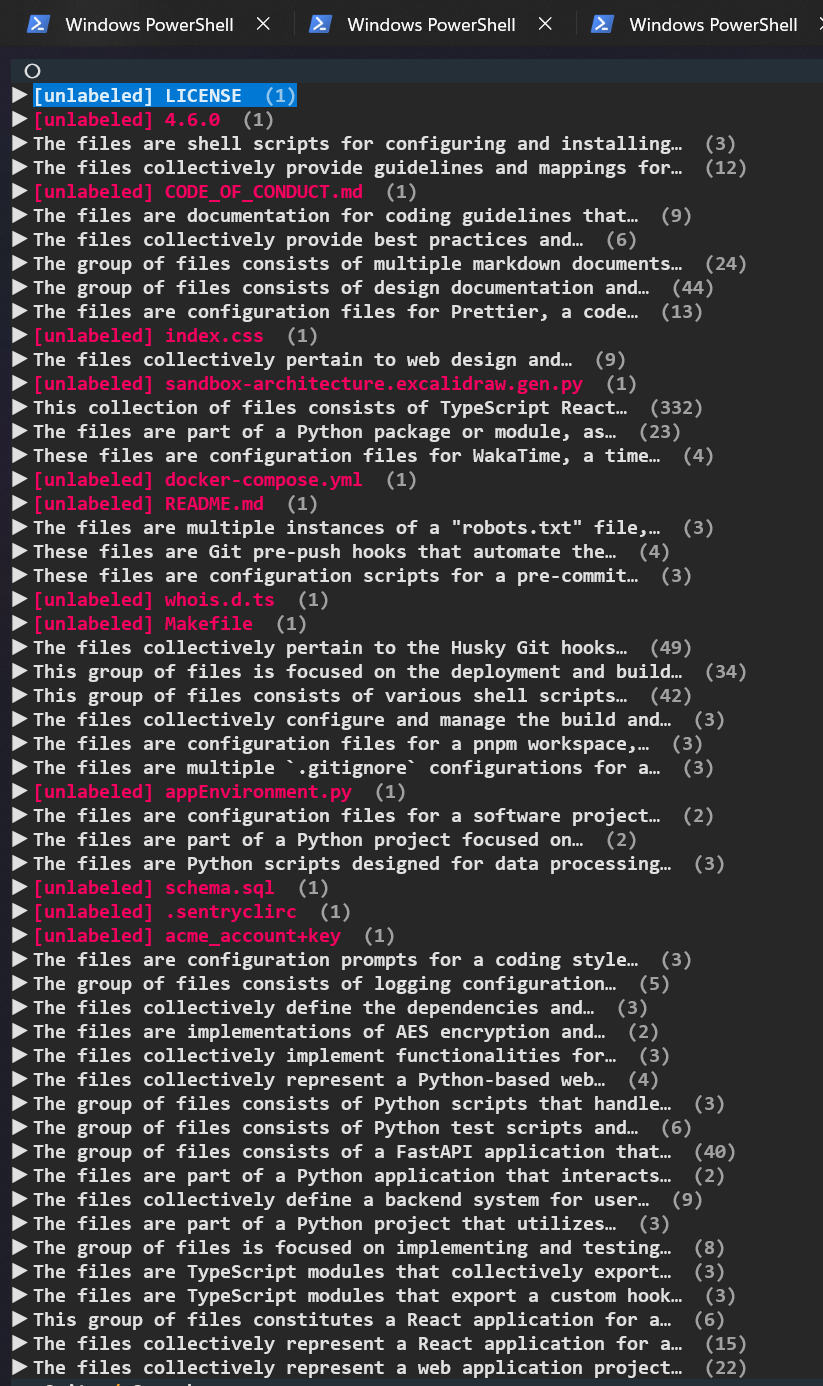
Visualizing the Tree
Besides just searching, I also wanted a way to browse everything. The tool reads the cluster hierarchy we made earlier and renders a visual tree structure right in the terminal. It shows the AI-generated labels as the “folders,” so you can actually see how your files are semantically organized.
The Last Step: Natural Language Searching
Because all files are stored as semantic vectors, you can search them using natural language instead of exact keyword matches.
- Query Embedding: The search command takes your natural language query (for example, “My dead letter management project”) and passes it through the exact same
sentence-transformersmodel to create a query vector. - Similarity Search: It runs a nearest neighbor vector search against the SQLite database (using
sqlite-vecfor speed, or a Python fallback if the extension isn’t available) to find the file embeddings that are mathematically closest to your query vector. - Results: It returns a ranked list of the most relevant file paths and their similarity scores.
AI/ML isn’t my main career path, but I really love exploring computer concepts, so I branch into it sometimes for fun, and it’s really enjoyable.
Here is the GitHub link if you find it interesting and want to explore or use the tool personally: https://github.com/sodiqscript111/rqlex